Bismillahirahmanirahim....
2009-10-19

2009-03-29
run exe on opensuse - Wine
Wine is an open-source implementation of Windows API for Linux. This enables you to run your favorite Windows programs on Linux.
SUSE Linux ES 9 & Novell Linux Desktop 9
SUSE Linux Enterprise Desktop 10 and SUSE Linux Enterprise Server 10:
openSUSE 10.3:
openSUSE 11.0:
openSUSE 11.1:
src : http://en.opensuse.org/Wine
Wine makes Linux "pose" as Windows. Unlike VMWare, Xen and others which pretend to be a computer, on which you then run the real Microsoft Windows as you would on a physical machine, Wine instead just pretends to be Windows, by offering applications the Windows API and functions they use, and mapping them to the corresponding Linux API.
Given that Wine pretends to be Windows, and Windows is complex and convoluted, this posing works only to a certain degree, and varies a lot depending on which Windows application you use, which functions it uses and how complete the Wine implementation is. You can check the Wine Application Database for other people's experiences with your application. Both regular office apps and games are supported by the standard Open-Source Wine shipped with openSUSE. There are also some non-free versions of Wine which support other applications.
Use
Of course, Wine needs to be installed, see Repositories below.
To use the Windows program, first Linux needs to have access to it. The preferred (more reliable and secure) way is to install it from the Windows program's installation CD, by running the setup.exe with Wine, i.e. when openSUSE recognizes the inserted CD and opens it in Konqueror, you just click on setup.exe.
By default, the emulated drive C: will be a directory on the Linux partition, and you can install your program there. You don't need to have Microsoft Windows installed nor to access any possibly existing Windows partition.
Afterwards, you start the program via one of the ways listed below.
From Konqueror
You should be able to just click on a Windows .exe file in your file manager (e.g. Konqueror). That should start the program in Wine (TODO verify common file managers).
CDs that you insert should appear under /media/, and the C: drive in Wine is mapped by default to ~/.wine/drive_c/ - paste that in your Konqueror address bar and make a bookmark.
From shell
If you open a terminal (e.g. Konsole), you can also type wine "/media/dvd/setup.exe" or wine "/media/c/Program Files/Mozilla Firefox/firefox.exe", where the italics part is the path to the program you want to start, and it depends on your system and your application. The quotes are needed if you have spaces in the pathname.
From start menu
If you want to have an entry for the program in your start / KDE / SuSE menu, you can open the menu folder where want to place it, then click the right mouse button for the context menu, and select "Edit menu". You should see an application "KDE menu editor" opening. Click File | New element..., enter a name and description for it, and enter as "command" the same command as described under "From shell" above. Test the command in a shell first before adding it to the menu.
Commercial Wine versions
You can just install the Open-Source Wine for SuSE - see below. There are also two commercial products based to a large part on Wine: Crossover Office and Cedega. Both have made changes to Wine to improve the execution of some specific applications on which they concentrate. You should check their list of supported applications.
Crossover Office (from CodeWeavers) supports use of some office software like MS Office and Adobe Photoshop on Linux. See the Compatibility list.
Cedega (from TransGaming) can be used to play certain supported Windows based games on Linux. See the Cedega Games Database. Note that both Cedega and Open-Source Wine support playing DirectX and OpenGL games, but the gaming related codebases are very different since they forked some years ago.
Repositories
Up to date Wine RPMs are available from:
http://software.opensuse.org/download/Emulators:/Wine/SLES9_and_NLD9/SUSE Linux Enterprise Desktop 10 and SUSE Linux Enterprise Server 10:
http://software.opensuse.org/download/Emulators:/Wine/SLE-10/openSUSE 10.3:
http://software.opensuse.org/download/Emulators:/Wine/openSUSE_10.3/openSUSE 11.0:
http://download.opensuse.org/repositories/Emulators:/Wine/openSUSE_11.0/openSUSE 11.1:
http://download.opensuse.org/repositories/Emulators:/Wine/openSUSE_11.1/Above URLs provide both "YUM" and old style "YAST" repositories and can be added by the YAST Installation Sources module, rug, zypper or smart.
On AMD64 and EM64T systems the i586 packages are supposed to be used, since a 32bit WINE version is required to run Win32 binaries at this time.
Following packages are available:
- wine: Builds of the biweekly WINE beta releases. This is the recommended version for most users.
- wine-snapshot: Daily builds of the current WINE GIT state. Only for the experienced user, can potentially be broken!
The SUSE Wine packages are maintained by Marcus, E-mail: meissner@suse.de
Utilities
Wine Doors
Wine Doors is a menu driven installer for standard Windows components, with option of downloading components.
Wine Doors is in the wine-doors package in above repositories.
WineTools
WineTools is a menu driven installer for installing over 100 Windows programs under the x86 (AMD Athlon or Intel Pentium) processor architecture on the Linux operating system using Wine. Examples of installable Windows software include:
- DCOM98
- Internet Explorer ver. 6
- Windows Core Fonts
- Windows System Software
- MS Office & MS Office Viewer
- Adobe Photoshop 7 & Illustrator 9
Note: WineTools work with wine-0.9.3 and older only. WineTools does not follow standard Wine conventions to achieve Windows compatibility. It will change your .wine/ configuration. To increase compatibility WineTools will use native Windows dll files. Those require a valid Windows or third party license and are covered as proprietary software under the applicable agreements.
IES4Linux
IES4Linux is a tool created explicitly to simplify using Internet Explorer with WINE.
It provides an easy automated setup process and supports Internet Explorer versions 5&6.
See also Internet Explorer 6 install HOWOTO in Gentoo wiki article
Picasa2
Google Labs has ported the Picasa2 photo organizer through its own implementation of wine.
Picasa for Linux
Source
The possibility to install from source is also an option. This is usually needed only if you are debugging Wine, or if you want to compile an older separate version of wine for different programs.
Building on x86 (32bit)
Necessary RPM: gcc, make, flex, bison, ncurses-devel, giflib-devel, liblcms-devel, libxslt-devel, Mesa-devel, libpng-devel, libxml2-devel, freeglut-devel, zlib-devel, glibc-devel, fontconfig-devel, xorg-x11-devel, libjpeg-devel, unixODBC-devel, freetype2-devel, openssl-devel, openldap2-devel
Configure: ./configure --prefix=
4-bit
Necessary RPM: gcc, make, flex, bison, ncurses-devel-32bit, giflib-devel-32bit, liblcms-devel-32bit, libxslt-devel-32bit, Mesa-devel-32bit, libpng-devel-32bit, libxml2-devel-32bit, freeglut-devel-32bit, zlib-devel-32bit, glibc-devel-32bit, fontconfig-devel-32bit, xorg-x11-devel-32bit, xorg-x11-libXext-32bit, xorg-x11-libXp-32bit, xorg-x11-libXt-32bit, capi4linux-32bit, xorg-x11-libICE-32bit, xorg-x11-libXext-devel-32bit, sane-32bit, cups-libs-32bit, libjpeg-devel-32bit, unixODBC-devel-32bit, freetype2-devel-32bit, openssl-devel-32bit, openldap2-devel-32bit, freetype2-devel-32bit, hal-32bit, hal-devel,
NOTE: This list may not contain every requirement and may vary between openSUSE versions.
Configure: ./configure --prefix=
[edit]
Configuration
Wine is configured by typing winecfg on the command line. This will map all drives for wine and create a .wine on your home folder the first time it's run and then open the Wine configuration dialog. It's recommended that you eject all removable drives before running winecfg as these may confuse the installation.
The file user.reg inside the .wine folder controls wine's appearance.
Here is a "How to" by minio that shows how to make wine look more like the GTK industrial theme: http://ubuntuforums.org/showthread.php?t=55286
Sometimes, an application can depend on a Windows font that is not directly available by wine; it will then use to alphabetically the first font available, which might be some obscure fixed-space font, hebrew font or something. Try to cp /usr/share/wine/fonts/* ~/.wine/drive_c/windows/fonts/ in case you hit this problem.
src : http://en.opensuse.org/Wine
2009-03-28
installation PHP on OpenSuse
One of the many popular combinations in Linux is the LAMP setup. LAMP to expand is Linux Apache MySQL PHP. Most of the websites running on the internet these days or LAMP servers where
Linux is your flavor opensource operating system (openSUSE for us :-))
Apache2 is the master webserver on the planet
MySQL is your favorite opensource database
PHP is the popular web programming language
The easiest way to get the LAMP server installed would be to install LAMP from the YaST GUI as follows:
1. Computers - YaST - Install Software - Set filter to “Patterns” then select and accept “Web and LAMP” under Server functions. But, this installs things we don’t need from LAMP perpesctive like DNS, Perl modules etc.
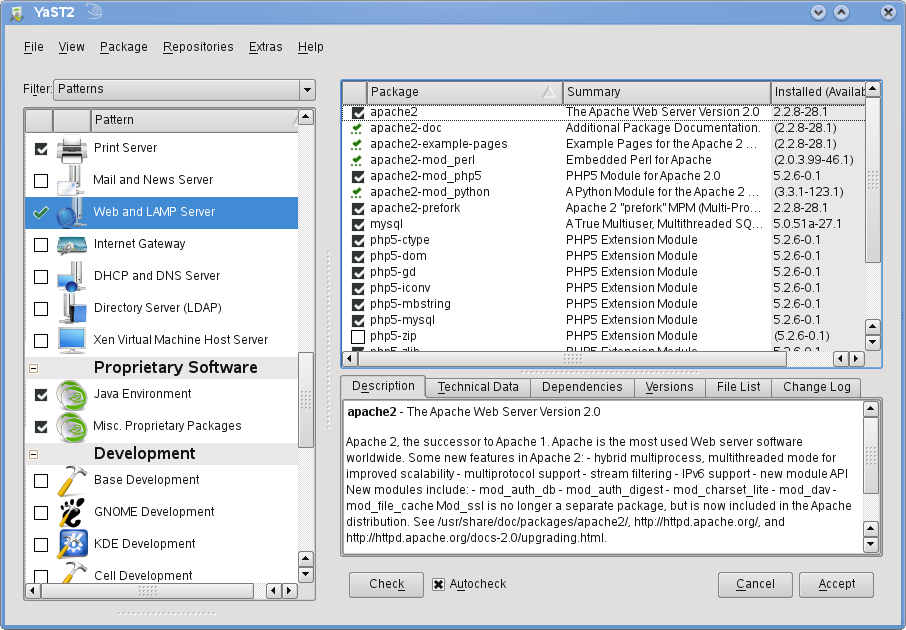
I prefer the manual option to setup a LAMP Server.
So without wasting much of time, lets proceed to get LAMP up and running on your openSUSE in no time. I’m using openSUSE 11.0 but the procedure should equally work on earlier 10.3 and other 10.2 versions.
Install & Configure Apache2 Webserver
Install Apache webserver
opensuse11:~ # yast2 –install apache2
This should install apache webserver. To check try the following command:
opensuse11:~ # rcapache2 status
Checking for httpd2: unused
That tells you, the Apache webserver is installed but just not started yet.
To test if the webserver serves pages, add a file index.html into /srv/www/htdocs/ directory. This is the default web root directory for apache on your system.
opensuse11:~ # cd /srv/www/htdocs
opensuse11:~ # vi index.html
and enter some text say “Welcome to openSUSE 11.0”
Start Apache2 Webserver
Now start the Apache 2 webserver so we can check if it works OK.
opensuse11:~ # rcapache2 start
Starting httpd2 (prefork) done
Now, open a web browser like Firefox and go to http://localhost and you should see the ext you entered (here “Welcome to openSUSE 11.0″)
Let’s proceed to install PHP5
Install PHP5
opensuse11:~ # yast2 –install php5 php5-mysql apache2-mod_php5
This should install PHP5, PHP5-MySQL module and the Apache2 PHP5 module.
For Apache2 to enable the PHP5 module, restart for changes to take effect.
opensuse11:~ # rcapache2 restart
Syntax OK
Shutting down httpd2 (waiting for all children to terminate) done
Starting httpd2 (prefork) done
Install & configure MySQL
opensuse11:~ # yast2 –install mysql mysql-tools
This should install MySQL Database Server and options mysql-tools (for administration) on your openSUSE. To check the installation, run the following command:
opensuse11:~ # rcmysql status
Checking for service MySQL: unused
The above indicates that the MySQL Server is installed but not started yet.
Start MySQL Server
opensuse11:~ # rcmysql start
Starting service MySQL done
By default there is no root password set for MySQL and it is important to set the password for the ROOT account.
Set Root Password
opensuse11:~ # mysqladmin -u root -p rootpassword
This should set the root password as “rootpassword”. Set the password to something more appropriate.
To check if Root password is set and the MySQL Client can logon to the MySQL Server try the following:
opensuse11:~ # mysql -u root -p
Enter password:
Welcome to the MySQL monitor. Commands end with ; or \g.
Your MySQL connection id is 1
Server version: 5.0.51a SUSE MySQL RPMType ‘help;’ or ‘\h’ for help. Type ‘\c’ to clear the buffer.
mysql> show databases;
+——————–+
| Database |
+——————–+
| information_schema |
| mysql |
| test |
+——————–+
3 rows in set (0.04 sec)mysql>
In the above, I used mysql client to logon as root, entered the password and list the databases. That completes the installation of LAMP on openSUSE 11.0
To administer MySQL database, the easiest and the popular tool is phpMyAdmin, given that we have discussed PHP5, apache2 setup here which are required for phpMyAdmin, it makes sense to look at quickly setting up and configure phpMyAdmin
Install phpMyAdmin
opensuse11:~ # yast2 –install phpMyAdmin
This installs phpMyAdmin and setup a website at /srv/www/htdocs/phpMyAdmin directory. Change directory and use the sample config file to quickly setup phpMyAdmin.
opensuse11:~ # cd /srv/www/htdocs/phpMyAdmin
opensuse11:~ # cp config.sample.inc.php config.inc.php
Edit the file and look for
$cfg['blowfish_secret'] = ‘mysqladmin’;
Enter a value for blowfish secret (I’ve set it to mysqladmin here)
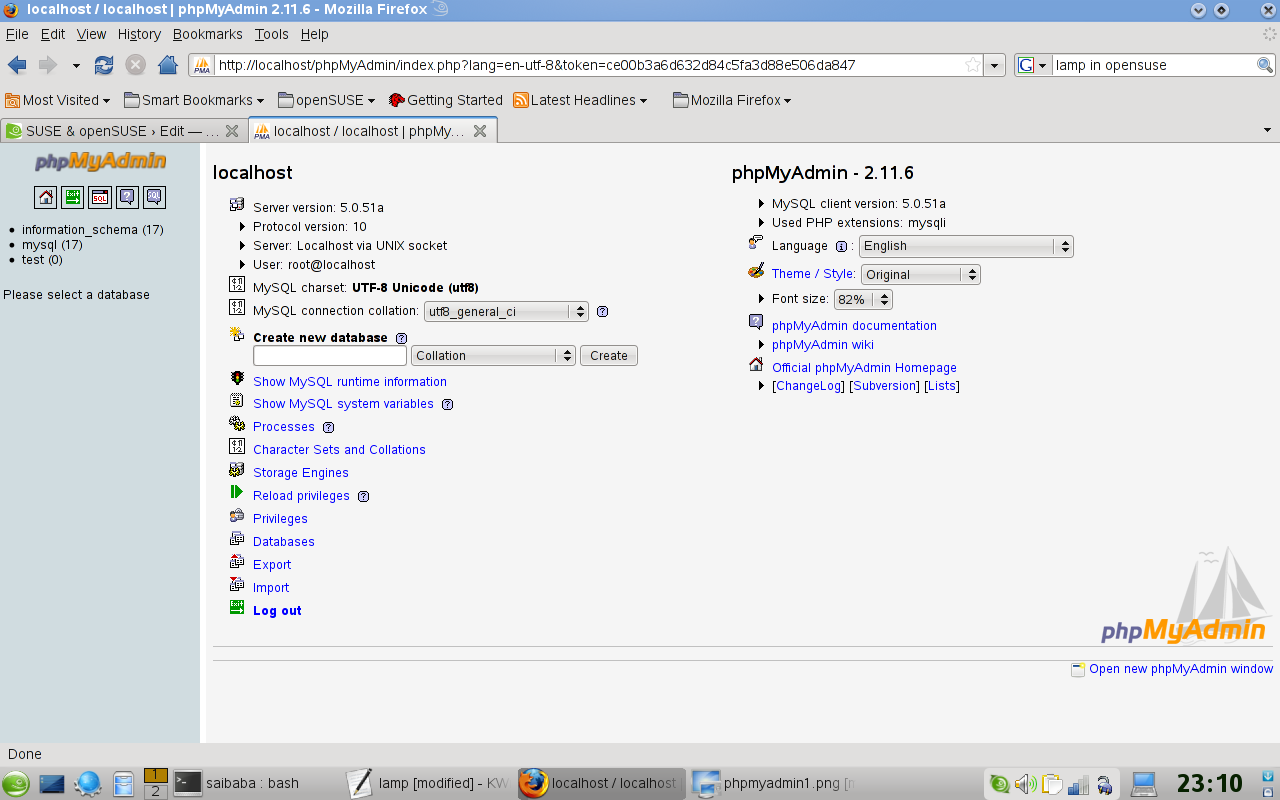
Thats done and has the default configs on it. Logon to phpMyAdmin from http://localhost/phpMyAdmin with the MySQL root username and password.
For advanced documentation, click here

Counter Strike on openSUSE 11.0
Salah satu hal yang membuat saya kadang menggunakan laptop isteri yang memiliki dual boot openSUSE dengan Windows adalah karena bisa menggunakan games online counter-strike. Game lama sebenarnya, tapi saya kerap memainkannya karena memang cukup menyenangkan.
Saya pernah sebentar testing wine untuk mencoba menjalankannya. Gagal dan saya tidak berlanjut mencari tahu bug dan solusinya. Lagi nggak ada waktu
Setelah kemarin ada kesempatan melakukan download CrossOver Office (versi komersil dari wine) secara legal sebagai bagian dari promo lame-duck, saya berkesempatan melakukan download CrossOver Office for Games dan melakukan ujicoba Counter Strike. Ternyata, berhasil )
)
Berikut adalah langkah-langkahnya :
Saya pernah sebentar testing wine untuk mencoba menjalankannya. Gagal dan saya tidak berlanjut mencari tahu bug dan solusinya. Lagi nggak ada waktu
Setelah kemarin ada kesempatan melakukan download CrossOver Office (versi komersil dari wine) secara legal sebagai bagian dari promo lame-duck, saya berkesempatan melakukan download CrossOver Office for Games dan melakukan ujicoba Counter Strike. Ternyata, berhasil
)Berikut adalah langkah-langkahnya :
- Instalasi CrossOver Games dengan melakukan eksekusi file sh dengan perintah sh install-crossover-games-7.1.2.sh. Ikuti wizardnya
- Buka menu CrossOver Games | Install Windows Software
- Install Counter Strike
- Run melalui menu yang ada di desktop


2009-03-25
Bicara Kematian
Bismillahirrahmanirrahim...
Alhamdulillahirabbil alamin, segala puji bagi Allah Tuhan yang Awal dan Yang Akhir.
Sang Pengatur Kehidupan kita, kapan kita mati dan kapan kita hidup.
malam ini sembari kutak katik keyboard, saya temukan sebuah filem dari youtube sebagai berikut :
kematian itu tidak mengenal waktu dan tempat. Mengerikan....!!! Sebuah episode berakhirnya kehidupan seorang hamba Allah,dan menentukan kehidupan Nyata di akherat sana. Apakah akan berakhir dengan Suul Khotimah (Mati dan Keadaan Jelek) dan Khusnul Khotimah ( Mati Dalam Keadaan Baik ). Sebuah pilihan yang HARUS di pilih dan kita tidak bisa mengelak....
Kematian, tidak bisa kita jemput dan kita tidak bisa lari dari nya.
Entah dalam kondisi seperti apa kita ketika di panggil oleh sang malaikat Izrail. Hanya Allah yang Maha Tahu. Bayangkan ...! apa yang terjadi jika kita di panggil di waktu2 kita yang telah lewat dan dalam kondisi sedang berbuat maksiat? Naudzubillah. Segala Puji Bagi Allah Sampai saat ini kita masih di beri umur oleh-Nya untuk memperbaiki kesalahan2 kita. Alhamdulillah ya ALlah.
Semoga tulisan iniyang kita baca bisa menjadi bahan renungan semua, jadikan sisa umur kita umur yang berkualitas di hadapan-Nya dan Menolong kita ketika di hari pengadilan nanti.
Amin Ya Allah, jadikanlah sisa umur kami umur yang berkah dan barokah dan matikanlah kami dalam keadaan Khusnul Khotimah. Amin
Video Tambahan :
1. Mati dalam keadaan berkhotbah
2. Mati dalam keaddan Jinah
Alhamdulillahirabbil alamin, segala puji bagi Allah Tuhan yang Awal dan Yang Akhir.
Sang Pengatur Kehidupan kita, kapan kita mati dan kapan kita hidup.
malam ini sembari kutak katik keyboard, saya temukan sebuah filem dari youtube sebagai berikut :
kematian itu tidak mengenal waktu dan tempat. Mengerikan....!!! Sebuah episode berakhirnya kehidupan seorang hamba Allah,dan menentukan kehidupan Nyata di akherat sana. Apakah akan berakhir dengan Suul Khotimah (Mati dan Keadaan Jelek) dan Khusnul Khotimah ( Mati Dalam Keadaan Baik ). Sebuah pilihan yang HARUS di pilih dan kita tidak bisa mengelak....
Kematian, tidak bisa kita jemput dan kita tidak bisa lari dari nya.
Entah dalam kondisi seperti apa kita ketika di panggil oleh sang malaikat Izrail. Hanya Allah yang Maha Tahu. Bayangkan ...! apa yang terjadi jika kita di panggil di waktu2 kita yang telah lewat dan dalam kondisi sedang berbuat maksiat? Naudzubillah. Segala Puji Bagi Allah Sampai saat ini kita masih di beri umur oleh-Nya untuk memperbaiki kesalahan2 kita. Alhamdulillah ya ALlah.
Semoga tulisan iniyang kita baca bisa menjadi bahan renungan semua, jadikan sisa umur kita umur yang berkualitas di hadapan-Nya dan Menolong kita ketika di hari pengadilan nanti.
Amin Ya Allah, jadikanlah sisa umur kami umur yang berkah dan barokah dan matikanlah kami dalam keadaan Khusnul Khotimah. Amin
Video Tambahan :
1. Mati dalam keadaan berkhotbah
2. Mati dalam keaddan Jinah
2009-02-16
Merenungi Umur
Ternyata berkurang juga umur-ku ini.....prasaan baru kemarin di gendong ma sodara..bermain hom pim pah...
2009-01-13
Tabkirut Tajnid
Pagi itu, situasi kota Mansoura berjalan seperti biasa. Kendaraan terlihat mulai berdesak-desakan di jalan-jalan yang sempit. Suara klakson bertabrakan di udara kota, membangunkan penghuninya untuk mulai beraktivitas. Di salah satu sudut jalan, tempat berdirinya sebuah bangunan megah ada kejadian yang menarik. Tepatnya di super market
Awadallah, kejadian ini mengambil settingnya. Pelakunya adalah seorang anak berseragam Tsanawiyah dengan seorang pria dewasa berbaju parlente.
Alkisah, pria tersebut sedang berbelanja untuk keperluan rumah tangganya. Terlihat beberapa jenis barang telah memenuhi setengah keranjang barang yang didorongnya. Ketika sedang asyik memilih susu, ia tidak menyadari bahwa ada sepasang mata yang senantiasa mengawasinya dari jauh. Pria itu lalu memilih satu merk susu yang sering
dikunsumsinya dan memasukkannya ke dalam keranjang barang. Ia segera menuju ke kasir untuk membayar. Tapi tiba-tiba ia terhenti karena di hadapannya ada seorang anak perempuan berseragam sekolah Tsanawiyah menghalangi langkahnya.
“Maaf paman, ada satu barang yang saya tidak setuju paman membelinya” kata anak perempuan tersebut kepada pria berbaju parlente.
“Mohon paman mengembalikan barang itu ke tempatnya dan memilih barang yang lain” lanjut si anak. Pria itu terkejut. Kenapa ada seorang anak perempuan yang berani protes dengan barang yang menjadi haknya. Karena heran ia balik bertanya:
“Barang apa itu?”
“Susu yang terakhir paman beli” jawab si anak.
Pria itu semakin heran, memangnya ada apa dengan susu yang barusan dibelinya.
Ia kemudian mengeceknya kembali. Mungkin si anak mengingatkannya agar tidak mengkonsumsi susu tersebut karena masa berlakunya sudah habis. Tapi, ketika ia memeriksa label produksi, tidak ada yang bermasalah. Terhitung baru satu minggu susu itu diproduksi. Lalu ada masalah apa?
Karena bingung, pria itu kembali bertanya kepada si anak “Kenapa adik meminta saya untuk mengembalikan susu ini, apa ada yang salah dengan susu ini?” Mendengar pertanyaan itu, si anak menarik napas panjang. Ia seakan mengumpulkan seluruh tenaganya untuk memberikan jawaban,
“Paman, apakah paman tahu kalau susu yang barusan paman beli produk negara Denmark, negara yang menghina dan merendahkan martabat Nabi kita dengan kartun-kartun amoral? “Paman,
sebagai seorang muslim kita seharusnya tidak lagi membeli produk-produk negara Denmark. Apakah paman sanggup bertemu dengan Rasulullah saw nanti di hari kiamat
sementara paman masih meminum susu buatan negara yang menghina beliau?”
Lanjut si anak dengan penuh keyakinan.
Pria itu menarik napas panjang. Ada kekaguman dalam hatinya melihat anak perempuan yang ada di hadapannya. Sekalipun masih duduk di bangku Tsanawiyah, tapi komitmennya terhadap Islam melebihi dirinya. Ia bahkan tidak terpikir untuk memboikot produk-produk Denmark. Setelah menimbang-nimbang, ia akhirnya menuruti kehendak hati anak perempuan itu. Susu Denmark yang ada di keranjang ia ambil dan dikembalikan ke
tempatnya semula. Si anak perempuan mengucapkan terima kasih kemudian segera berlalu ke tempat lain di dalam super market.
Setelah si anak pergi, hati pria dewasa itu kembali diusik dengan nafsunya. Beragam pikiran berkecamuk di kepalanya. Ada satu pertanyaan muncul dalam benaknya:
“Apakah saya harus memboikot produk Denmark?”
Masalah boikot khan masih menjadi perdebatan ulama. Memang ada yang mengatakan bahwa boikot itu wajib. Tapi khan juga ada ulama-ulama lain yang membolehkan untuk mengkonsumsi barang-barang yang masuk kategori untuk diboikot. Lagi pula anak perempuan yang sempat memprotesnya sudah pergi. Toh, anak itu tidak akan melihat kalau ia mengambil kembali susu yang telah dikembalikannya.
Sambil menengok kiri-kanan, pria itu mengambil kembali susu yang baru saja ia taruh dan segera menuju ke kasir. Tapi sekali lagi, ia tidak menyadari bahwa ada sepasang mata yang masih mengawasinya di balik etalase-etalase super market. Mata itu semakin miris. Mulai ada kelopak-kelopak air yang perlahan-lahan menyembul di mata itu. Pemilik mata itu segera beranjak dari tempatnya menuju kasir.
Pria berbaju parlente yang sedang antri di kasir merasa sangat bersalah ketika tiba-tiba dari belakang anak perempuan yang sempat memprotesnya karena membeli susu datang menghampirinya dengan wajah berlinangan airmata. “Paman, bukankah sudah saya katakan bahwa susu yang paman beli itu produk Denmark? Bukankah paman juga tahu bahwa
koran Denmark telah menghina Nabi? Mengapa paman masih juga mau membeli produk orang-orang yang menghina Nabi? Lirih suara anak perempuan itu bercampur isak tangis bertanya kepadanya.
Pria itu sejenak tertegun. Tidak mampu berkata apa-apa. Baginya, membeli susu produk Denmark tidak berarti apa-apa. Tapi tidak bagi anak perempuan di hadapannya. Dalam pandangannya membeli satu susu produk Denmark toh tidak terlalu berpengaruh bagi pasang surut ekonomi negara Denmark. Khan untung yang didapat dengan satu susu bagi negara Denmark tidak berarti apa-apa. Masih ada orang lain yang lebih memiliki
komitmen dibanding dirinya untuk melakukan boikot. Tapi tidak bagi anak perempuan yang menangis di depannya. Bagi anak itu, seorang muslim yang membeli satu susu produk negara yang menghina Nabi berarti telah merelakan Nabi yang mulia untuk dihina dan dilecehkan. Bagi si anak, hal itu tidak boleh dibiarkan begitu saja. Tetap harus ada yang mengingatkan.
Sejurus kemudian, pria itu kembali ke tempat etalase susu ditemani si anak perempuan. Susu yang hampir dibayarnya segera ditaruh lagi. Ia kemudian menyatakan kepada anak perempuan yang ada di hadapannya:
“Adik saya berjanji bahwa mulai sekarang saya tidak akan lagi membeli produk-produk Denmark.”
Kisah di atas adalah kejadian nyata sebagaimana yang diceritakan oleh seorang kawan yang tinggal di Mansoura. Sengaja saya ceritakan kembali di sini untuk memperlihatkan kepada pembaca bahwa banyak orang yang mungkin memiliki paradigma seperti pria yang diceritakan di atas.
Mungkin ada di antara kita yang serba acuh tak acuh dan tidak merasa ikut bertanggung jawab terhadap pelecehan yang dilakukan oleh media massa negara Denmark terhadap nabi Muhammad saw.. Atau mungkin ada juga di antara kita yang ikut prihatin terhadap pelecehan tersebut tapi hanya sebatas tanggapan lisan saja. Ikut aktif demonstrasi di sana-sini tapi bingung, tindakan apalagi yang harus dilakukan untuk membuktikan
cinta kita terhadap nabi Muhammad saw.
Anak perempuan dalam kisah di atas mengajarkan kita satu tindakan riil, yang mungkin dilupakan oleh sebagian kita yang terjerat dengan aktivitas keseharian. Boikot! Merupakan tindakan riil. Boikot dalam skala kecil maupun skala besar. Satu susu seharga 3 sampai 4 pound Mesir sekilas tidak terlalu berpengaruh bagi naik-turunnya ekonomi Denmark. Tapi tetap merupakan produk yang harus diboikot.
Anak perempuan di atas mengajarkan kita bahwa tanggung jawab terhadap pelecehan yang dilakukan oleh koran Jylliands Posten di Denmark harus dipikul oleh seluruh umat Islam dalam semua tataran. Para pegawai yang sering terjebak dengan rutinitas kantor memiliki tanggungjawab yang sama dengan para demonstran yang turun ke jalan-jalan. Para ibu yang asyik mengurusi keperluan rumah tangga dan mengurusi anak memiliki tanggungjawab yang sama dengan para wartawan dan penulis yang bersuara lantang melalui penanya di media-media massa.
Dan tanggungjawab itu terakumulasi dalam satu kata: boikot! Karena keberadaan anak perempuan itu, bersama dengan teman-temannya yang lain dalam satu komitmen; bersama orangtuanya yang telah berhasil mendidiknya untuk memiliki komitmen; bersama para guru yang berhasil mengajarnya di bangku-bangku sekolah untuk mensosialisasikan kebenaran; dan bersama masyarakat yang turut mendukung dan juga ikut bertanggung
jawab mentarbiyah sehingga mereka dapat tumbuh menjadi batu karang yang mempertahakankan kebenaran. Buah dari tabkirut tajnid, pendinian tarbiyah; semua itulah yang menjadikan Barat kembali mengevaluasi pandangan mereka terhadap Islam. Ternyata, umat Islam sekalipun terkesan lemah, terpecah belah, terbelakang, tapi masih menyimpan satu kekuatan besar. Kekuatan itu bernama cinta dan komitmen, buah dari masyru’ tabkirut tajnid, program pendinian tarbiyah sejak di bangku
SLTP.
Cinta dan komitmen terhadap Islam yang dapat memaksa Denmark meminta maaf kepada umat Islam di seantero dunia. Karena mereka saat ini menghadapi kerugian ekonomi secara besar-besaran. Akibat aksi boikot yang dilakukan di negara-negara Islam, Denmark mengalami kerugian ekonomi hampir 1.8 juta dollar AS setiap hari atau sekitar 15 milyar rupiah.
Memasuki awal tahun ini, semangat tabkirut tajnid harus mendorong kita untuk melahirkan generasi-generasi yang cinta Islam, cinta Rasulnya dan cinta kepada umat Islam.
Awadallah, kejadian ini mengambil settingnya. Pelakunya adalah seorang anak berseragam Tsanawiyah dengan seorang pria dewasa berbaju parlente.
Alkisah, pria tersebut sedang berbelanja untuk keperluan rumah tangganya. Terlihat beberapa jenis barang telah memenuhi setengah keranjang barang yang didorongnya. Ketika sedang asyik memilih susu, ia tidak menyadari bahwa ada sepasang mata yang senantiasa mengawasinya dari jauh. Pria itu lalu memilih satu merk susu yang sering
dikunsumsinya dan memasukkannya ke dalam keranjang barang. Ia segera menuju ke kasir untuk membayar. Tapi tiba-tiba ia terhenti karena di hadapannya ada seorang anak perempuan berseragam sekolah Tsanawiyah menghalangi langkahnya.
“Maaf paman, ada satu barang yang saya tidak setuju paman membelinya” kata anak perempuan tersebut kepada pria berbaju parlente.
“Mohon paman mengembalikan barang itu ke tempatnya dan memilih barang yang lain” lanjut si anak. Pria itu terkejut. Kenapa ada seorang anak perempuan yang berani protes dengan barang yang menjadi haknya. Karena heran ia balik bertanya:
“Barang apa itu?”
“Susu yang terakhir paman beli” jawab si anak.
Pria itu semakin heran, memangnya ada apa dengan susu yang barusan dibelinya.
Ia kemudian mengeceknya kembali. Mungkin si anak mengingatkannya agar tidak mengkonsumsi susu tersebut karena masa berlakunya sudah habis. Tapi, ketika ia memeriksa label produksi, tidak ada yang bermasalah. Terhitung baru satu minggu susu itu diproduksi. Lalu ada masalah apa?
Karena bingung, pria itu kembali bertanya kepada si anak “Kenapa adik meminta saya untuk mengembalikan susu ini, apa ada yang salah dengan susu ini?” Mendengar pertanyaan itu, si anak menarik napas panjang. Ia seakan mengumpulkan seluruh tenaganya untuk memberikan jawaban,
“Paman, apakah paman tahu kalau susu yang barusan paman beli produk negara Denmark, negara yang menghina dan merendahkan martabat Nabi kita dengan kartun-kartun amoral? “Paman,
sebagai seorang muslim kita seharusnya tidak lagi membeli produk-produk negara Denmark. Apakah paman sanggup bertemu dengan Rasulullah saw nanti di hari kiamat
sementara paman masih meminum susu buatan negara yang menghina beliau?”
Lanjut si anak dengan penuh keyakinan.
Pria itu menarik napas panjang. Ada kekaguman dalam hatinya melihat anak perempuan yang ada di hadapannya. Sekalipun masih duduk di bangku Tsanawiyah, tapi komitmennya terhadap Islam melebihi dirinya. Ia bahkan tidak terpikir untuk memboikot produk-produk Denmark. Setelah menimbang-nimbang, ia akhirnya menuruti kehendak hati anak perempuan itu. Susu Denmark yang ada di keranjang ia ambil dan dikembalikan ke
tempatnya semula. Si anak perempuan mengucapkan terima kasih kemudian segera berlalu ke tempat lain di dalam super market.
Setelah si anak pergi, hati pria dewasa itu kembali diusik dengan nafsunya. Beragam pikiran berkecamuk di kepalanya. Ada satu pertanyaan muncul dalam benaknya:
“Apakah saya harus memboikot produk Denmark?”
Masalah boikot khan masih menjadi perdebatan ulama. Memang ada yang mengatakan bahwa boikot itu wajib. Tapi khan juga ada ulama-ulama lain yang membolehkan untuk mengkonsumsi barang-barang yang masuk kategori untuk diboikot. Lagi pula anak perempuan yang sempat memprotesnya sudah pergi. Toh, anak itu tidak akan melihat kalau ia mengambil kembali susu yang telah dikembalikannya.
Sambil menengok kiri-kanan, pria itu mengambil kembali susu yang baru saja ia taruh dan segera menuju ke kasir. Tapi sekali lagi, ia tidak menyadari bahwa ada sepasang mata yang masih mengawasinya di balik etalase-etalase super market. Mata itu semakin miris. Mulai ada kelopak-kelopak air yang perlahan-lahan menyembul di mata itu. Pemilik mata itu segera beranjak dari tempatnya menuju kasir.
Pria berbaju parlente yang sedang antri di kasir merasa sangat bersalah ketika tiba-tiba dari belakang anak perempuan yang sempat memprotesnya karena membeli susu datang menghampirinya dengan wajah berlinangan airmata. “Paman, bukankah sudah saya katakan bahwa susu yang paman beli itu produk Denmark? Bukankah paman juga tahu bahwa
koran Denmark telah menghina Nabi? Mengapa paman masih juga mau membeli produk orang-orang yang menghina Nabi? Lirih suara anak perempuan itu bercampur isak tangis bertanya kepadanya.
Pria itu sejenak tertegun. Tidak mampu berkata apa-apa. Baginya, membeli susu produk Denmark tidak berarti apa-apa. Tapi tidak bagi anak perempuan di hadapannya. Dalam pandangannya membeli satu susu produk Denmark toh tidak terlalu berpengaruh bagi pasang surut ekonomi negara Denmark. Khan untung yang didapat dengan satu susu bagi negara Denmark tidak berarti apa-apa. Masih ada orang lain yang lebih memiliki
komitmen dibanding dirinya untuk melakukan boikot. Tapi tidak bagi anak perempuan yang menangis di depannya. Bagi anak itu, seorang muslim yang membeli satu susu produk negara yang menghina Nabi berarti telah merelakan Nabi yang mulia untuk dihina dan dilecehkan. Bagi si anak, hal itu tidak boleh dibiarkan begitu saja. Tetap harus ada yang mengingatkan.
Sejurus kemudian, pria itu kembali ke tempat etalase susu ditemani si anak perempuan. Susu yang hampir dibayarnya segera ditaruh lagi. Ia kemudian menyatakan kepada anak perempuan yang ada di hadapannya:
“Adik saya berjanji bahwa mulai sekarang saya tidak akan lagi membeli produk-produk Denmark.”
Kisah di atas adalah kejadian nyata sebagaimana yang diceritakan oleh seorang kawan yang tinggal di Mansoura. Sengaja saya ceritakan kembali di sini untuk memperlihatkan kepada pembaca bahwa banyak orang yang mungkin memiliki paradigma seperti pria yang diceritakan di atas.
Mungkin ada di antara kita yang serba acuh tak acuh dan tidak merasa ikut bertanggung jawab terhadap pelecehan yang dilakukan oleh media massa negara Denmark terhadap nabi Muhammad saw.. Atau mungkin ada juga di antara kita yang ikut prihatin terhadap pelecehan tersebut tapi hanya sebatas tanggapan lisan saja. Ikut aktif demonstrasi di sana-sini tapi bingung, tindakan apalagi yang harus dilakukan untuk membuktikan
cinta kita terhadap nabi Muhammad saw.
Anak perempuan dalam kisah di atas mengajarkan kita satu tindakan riil, yang mungkin dilupakan oleh sebagian kita yang terjerat dengan aktivitas keseharian. Boikot! Merupakan tindakan riil. Boikot dalam skala kecil maupun skala besar. Satu susu seharga 3 sampai 4 pound Mesir sekilas tidak terlalu berpengaruh bagi naik-turunnya ekonomi Denmark. Tapi tetap merupakan produk yang harus diboikot.
Anak perempuan di atas mengajarkan kita bahwa tanggung jawab terhadap pelecehan yang dilakukan oleh koran Jylliands Posten di Denmark harus dipikul oleh seluruh umat Islam dalam semua tataran. Para pegawai yang sering terjebak dengan rutinitas kantor memiliki tanggungjawab yang sama dengan para demonstran yang turun ke jalan-jalan. Para ibu yang asyik mengurusi keperluan rumah tangga dan mengurusi anak memiliki tanggungjawab yang sama dengan para wartawan dan penulis yang bersuara lantang melalui penanya di media-media massa.
Dan tanggungjawab itu terakumulasi dalam satu kata: boikot! Karena keberadaan anak perempuan itu, bersama dengan teman-temannya yang lain dalam satu komitmen; bersama orangtuanya yang telah berhasil mendidiknya untuk memiliki komitmen; bersama para guru yang berhasil mengajarnya di bangku-bangku sekolah untuk mensosialisasikan kebenaran; dan bersama masyarakat yang turut mendukung dan juga ikut bertanggung
jawab mentarbiyah sehingga mereka dapat tumbuh menjadi batu karang yang mempertahakankan kebenaran. Buah dari tabkirut tajnid, pendinian tarbiyah; semua itulah yang menjadikan Barat kembali mengevaluasi pandangan mereka terhadap Islam. Ternyata, umat Islam sekalipun terkesan lemah, terpecah belah, terbelakang, tapi masih menyimpan satu kekuatan besar. Kekuatan itu bernama cinta dan komitmen, buah dari masyru’ tabkirut tajnid, program pendinian tarbiyah sejak di bangku
SLTP.
Cinta dan komitmen terhadap Islam yang dapat memaksa Denmark meminta maaf kepada umat Islam di seantero dunia. Karena mereka saat ini menghadapi kerugian ekonomi secara besar-besaran. Akibat aksi boikot yang dilakukan di negara-negara Islam, Denmark mengalami kerugian ekonomi hampir 1.8 juta dollar AS setiap hari atau sekitar 15 milyar rupiah.
Memasuki awal tahun ini, semangat tabkirut tajnid harus mendorong kita untuk melahirkan generasi-generasi yang cinta Islam, cinta Rasulnya dan cinta kepada umat Islam.
Subscribe to:
Posts (Atom)